
Avis IA : Cette fonctionnalité utilise la technologie IA pour traiter vos fichiers vidéo.
Repurposing solves the visibility problem for most podcast makers. The main idea is to take your best ideas and repackage them for the platforms your audience already uses, such as short-form video feeds (Instagram Reels, TikTok, YouTube Shorts), Twitter threads, LinkedIn feeds, and even email inboxes. The aim isn't to dilute your content, but to maximise the visibility of each idea and generate leads to the full episode.
Most podcasters just hit publish and move on, and that's a missed opportunity. A one-hour episode is full of great quotes, valuable lessons, and shareable stories, but not many people will sit through an hour of audio to find them. Below, we will look at five proven strategies, starting with the most effective one: AI-powered short clips.
Short video clips are the best way to let a wider audience discover podcasts at the moment. Short clips generate 2.5 times more engagement than longer videos, and 66% of consumers say they are the most engaging type of social content. With platforms such as TikTok, Instagram Reels, and YouTube Shorts receiving over 120 billion daily views, a single viral clip has the potential to introduce your podcast to a huge audience.
A 60-second clip on TikTok or Instagram Reels can introduce your podcast to thousands of people who might be interested in it and become your subscribers. The challenge is that finding the best moments, trimming them, and adding captions used to take hours of manual editing.
AI Video Cut can do this automatically. Just upload your podcast and the AI will scan the whole episode to find the most engaging, self-contained moments. The process is simple and takes just a few clicks:

2. Adjust the settings. Choose the output type, aspect ratio, and video language to ensure accurate transcription.
3. Select the style of captions or turn them off.
4. Click Submit and wait for your video to process.
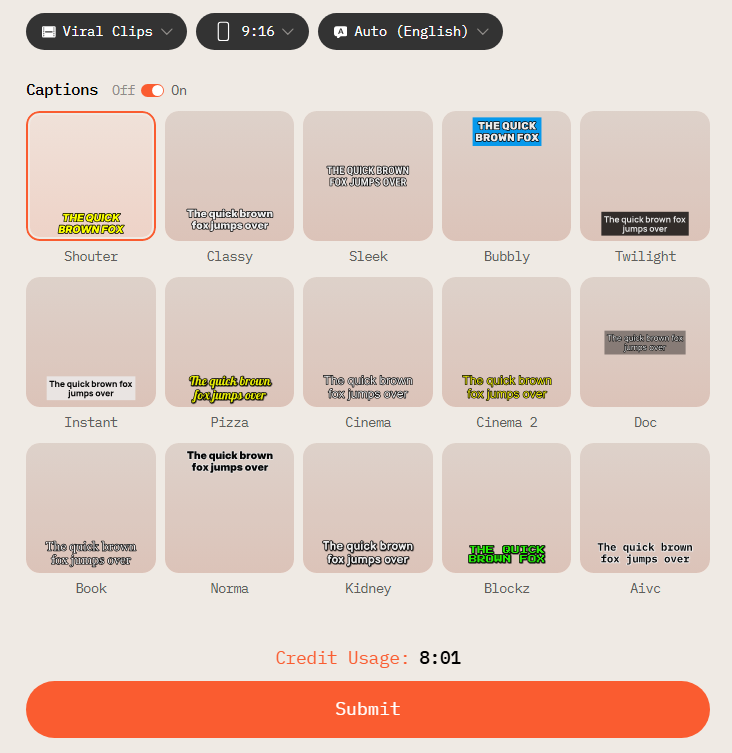
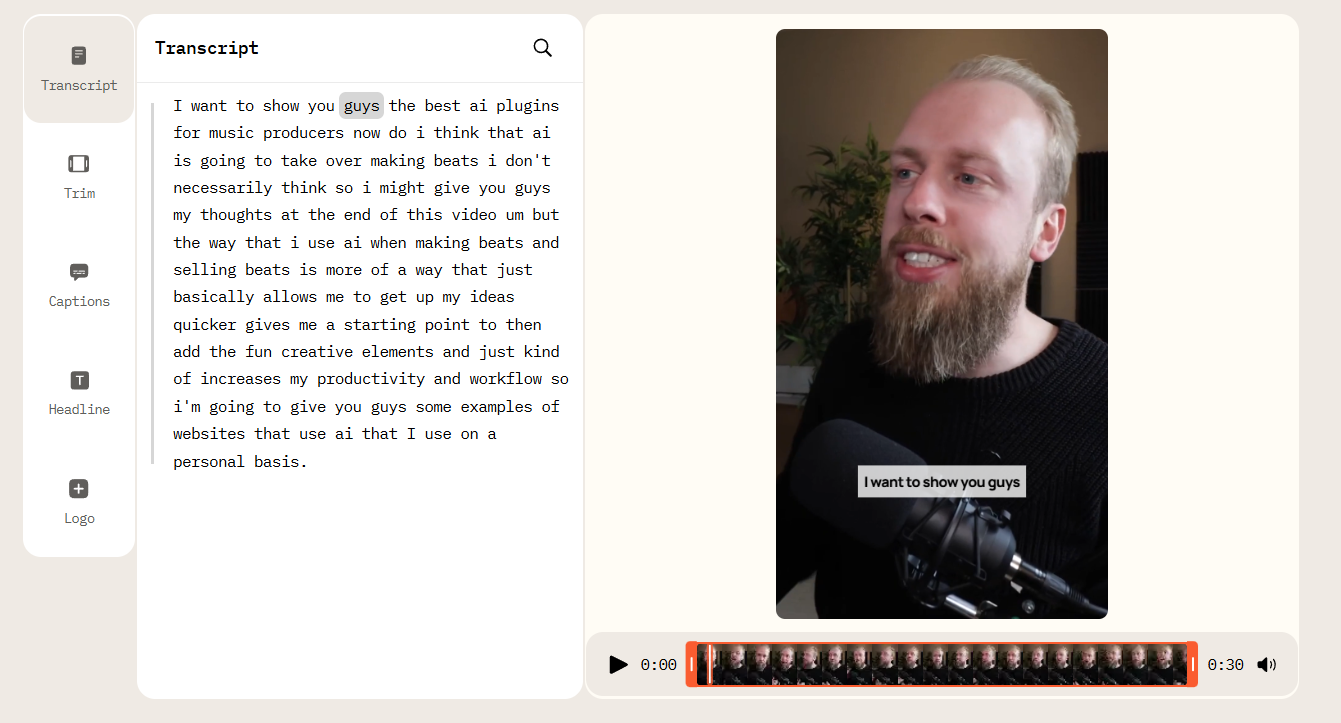
A one-hour podcast episode usually produces 5–15 short, quality clips. That's a week's worth of daily video content from a single recording session! You upload an episode once and publish it everywhere.
Short clips are the most effective and popular type of content and should act as your anchor. However, there are also platforms where the primary content format differs. These four text-based formats will help you to reach more people across platforms where video isn't as popular.

A well-structured thread gets your episode's core lesson down to its simplest, so skimmers and deep readers can enjoy it. It's a great way to repurpose your content because people who haven't even heard your podcast can get real value from it, which makes them curious enough to listen. This format is great for X and Threads.
How to structure your thread:
Quote graphics are one of the simplest types of evergreen content. If you pick a good line and put it on a clean, branded background, it can do wonders for you. The key is picking the right quotes. Try to see not the ones you're most proud of, but the ones that will make someone stop, like, or think “that’s relatable”.
Here are some examples of what those quotes can be:

Your show notes already have most of the info you need. You've got the episode summary, the main topics, and the guest's background. That’s a lot! The only thing missing is the first-person voice that makes LinkedIn posts feel human.
Here is how to write a post:
This method is quick and effective and takes about 10-15 minutes.

Your newsletter subscribers are your most engaged audience, and they care about your content. They've already signed up, meaning they're ready to hear from you. The mistake that most podcasters make is burying their episode link at the bottom of a list. Instead, lead with it!
Here is a newsletter formula:
This way, rather than asking subscribers to trust that the episode is worth an hour of their time, you're giving them a reason to click within the first three lines of the email.
Upload your podcast video or audio file to AI Video Cut. AI technology will automatically identify the most engaging segments, add captions, and export vertical clips ready for TikTok, Instagram Reels, and YouTube Shorts, all without any manual editing.
Combine short video clips (AI Video Cut can clip a full episode for you) with a Twitter/X thread, create quote graphics for Instagram, write a LinkedIn post based on your show notes, and build a newsletter intro around one key takeaway.
Most episodes take 5-10 minutes to process. Reviewing and editing clips usually takes an additional 10-15 minutes. The entire workflow, from upload to exporting the clips, usually takes under 30 minutes.
Clips between 45 and 90 seconds tend to perform best on TikTok, Instagram Reels, and YouTube Shorts. They're long enough to convey a complete idea, yet short enough to hold viewers' attention. AI Video Cut suggests clips within this range by default.
Avis IA : Cette fonctionnalité utilise la technologie IA pour traiter vos fichiers vidéo.