AI Video Cut icon

ValoresBlogAjuda

    How to Delete Your Account and Data

    ou

    If you'd like to permanently delete your AI Video Cut account and all associated data, you can do so directly from your account settings. Please note that this action is irreversible.
    Steps to delete your account

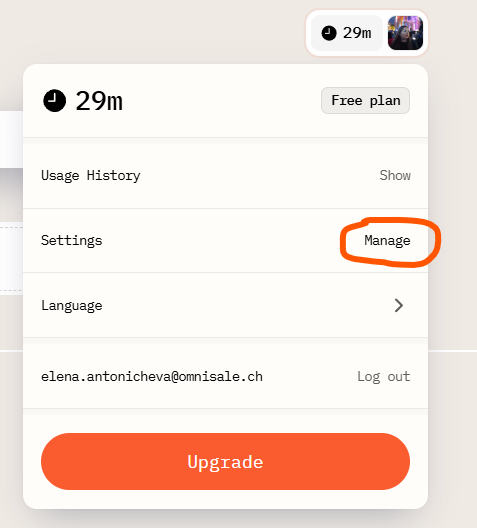
    1. Click your account icon (which shows your remaining minutes) in the top-right corner of the screen.
    1. In the panel that appears, click Manage under the Settings section.
    2. Alternatively, you can go directly to your account settings page.
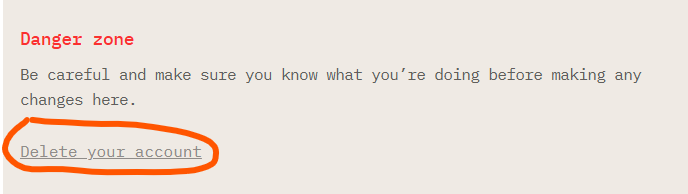
    3. Scroll to the bottom of the page until you reach the Danger zone, then click Delete your account.
    1. Confirm your choice by clicking Delete. If you change your mind, click Cancel instead.
    2. Once you're redirected to the sign-in page, your account and all associated data have been permanently deleted.

    Need help?

    If you run into any issues during this process, feel free to reach out to our support team for assistance.

    If you're experiencing an issue or something isn't working as expected, we'd love the chance to help. Please don't hesitate to contact us first! There's no need to rush into deleting your account if a quick fix or a chat with our team could solve the problem instead. Just click the chat button in the bottom-right corner.

    ou
    • Getting Started with AI Video Cut
    • How to Crop a Video with AI Video Cut
    • How to Create and Regenerate Short Video Clips with AI Video Cut
    • How to Monitor Your Video History and Minute Usage in AI Video Cut
    • How to Find the Best AI Video Cut Prompt for Your Content Goals
    • Best Practices for Custom Prompting
    • How to Use AI Video Cut Editor
    • How to Use AI Video Cut Mobile Editor
    • How to Repurpose Podcast Episodes
    • How to Add Captions to a Video with AI Caption Generator

    Reutilização de Vídeo Potencializada pela IA

    ©2026 Omnisale GMBH. Todos os direitos reservados.

    Explorar

    • Sobre nós
    • Blog
    • Valores
    • Programa de Afiliados
    • Ajuda

    Melhores práticas

    • Editor de Vídeo com IA
    • Gerador de Legenda com IA
    • Cortador de Vídeo com IA
    • Criador de clipes com IA para agências de mídias sociais
    • Criador de Clipe com IA
    • Criador de Reel do Instagram
    • Criador de Shorts do YouTube
    • Gerador de Vídeo de TikTok
    • Ferramentas de Vídeo para Twitter
    • Criador de Vídeo para E-Commerce
    • Criador de Clipe de Podcast
    • Melhor Alternativa Gratuita ao Opus Clip
    • Melhor Alternativa Gratuita ao Klap
    • Melhor Alternativa Gratuita ao Submagic
    • Melhor Alternativa Gratuita ao Vizard AI
    • Melhor Alternativa Gratuita ao 2short.ai
    • Melhor Alternativa Gratuita ao VEED
    Melhor Alternativa Gratuita ao Wisecut

    Contratos

    • Terms of Service
    • Privacy Policy
    • Refund Policy
    • Affiliate Program Agreement